

Appearance
Dashboard
Open Dashboard in UpForm for a quick view of submissions, storage, forms, and recent activity. From here you can jump to submissions, forms, support, and templates.
Overview metrics
At the top of the Dashboard, usage cards show your current totals and limits.
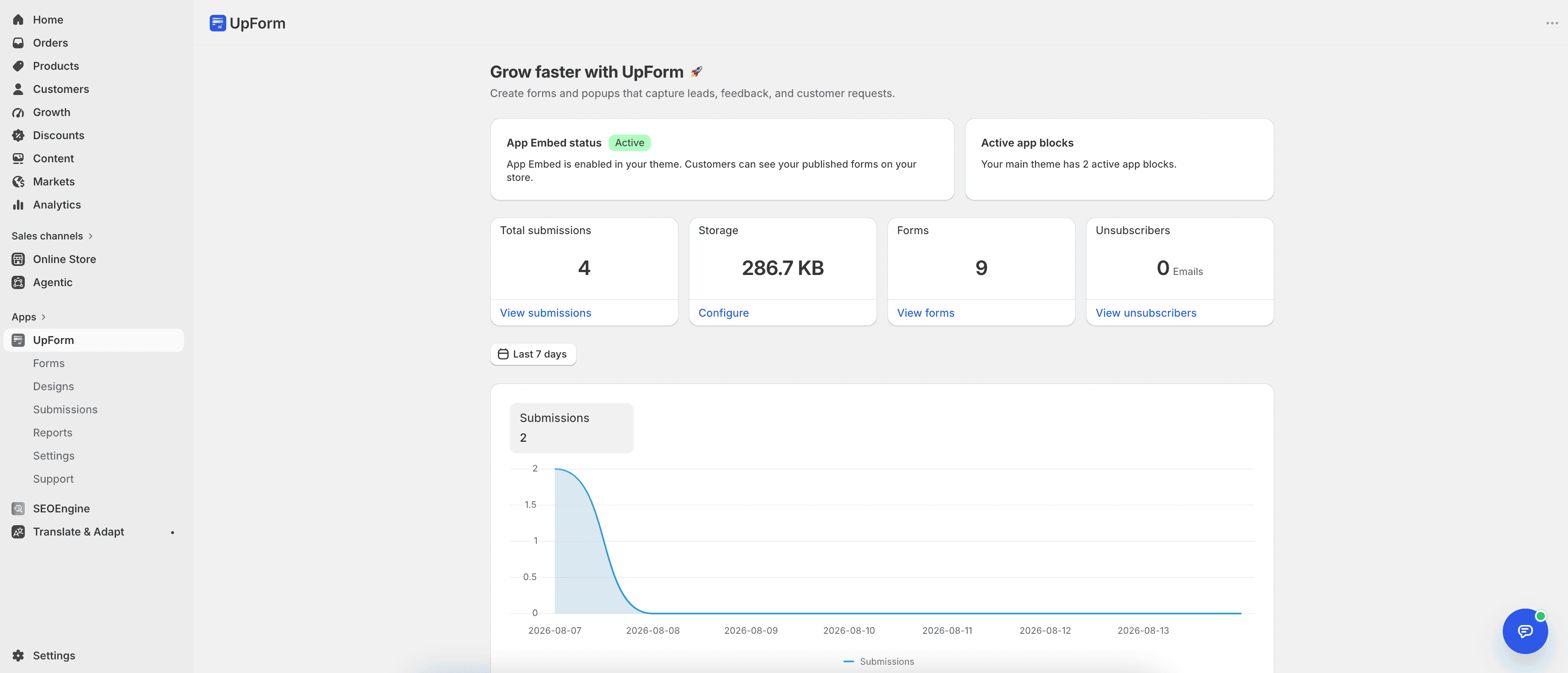
Cards can include:
- Monthly submissions — submissions in the current month versus your plan limit. Use View month to open the related view.
- Total submissions — all submissions collected across your forms. Use View submissions to open the Submission list.
- Storage — file storage used versus available quota. Use Configure to open storage settings (see General).
- Forms — number of forms in the app. Use View forms to manage them.
- Unsubscribers — customers who unsubscribed from form emails. Use View unsubscribers to review them (also covered in Reports).
Exact cards and limits depend on your plan and store activity.
Submissions chart
The chart shows submission activity over a selected date range (for example, Last 30 days).
- Open the date range control on the chart.
- Choose a range, then apply it if prompted.
- Review peaks and changes in the Submissions line over time.
Use this chart to spot busy periods and compare activity across days.
Support
The Support section gives quick access to help:
- Contact support — reach the UpForm team for setup or troubleshooting. You can also use Contact.
- Documentation — open step-by-step guides with View documentation.
Template ideas
Template ideas for your next form shows suggested templates you can start from.
Each card includes a preview and Use template. To browse the full library, click Discover all templates (the button also shows how many templates are available).
If this does not work as expected, Contact for help.