

Appearance
UpForm email provider
UpForm is the built-in email provider included with the app. Use it to send form emails without connecting an external service.
No SMTP keys or account setup are required. If you have not added a custom provider, forms can still send mail through the default UpForm mail system.
When to use UpForm
Choose UpForm under SMTP when you want the simplest option for:
- Admin notification emails
- Customer confirmation and verification emails
- Follow-up emails from submissions
Email delivery still depends on submission handling. Enable Save submission data in General for the form. If submission data is not saved, emails are not sent. See General and Email.
You can manage custom providers for the whole app in Settings → Email configuration. Selecting UpForm on a form does not require a custom provider there. See Email configuration.
Select UpForm for a form
- Open the form in the form builder.
- Open the Email tab.
- Open the SMTP section.
- Under Select provider to send emails, choose UpForm.
- Save the form.
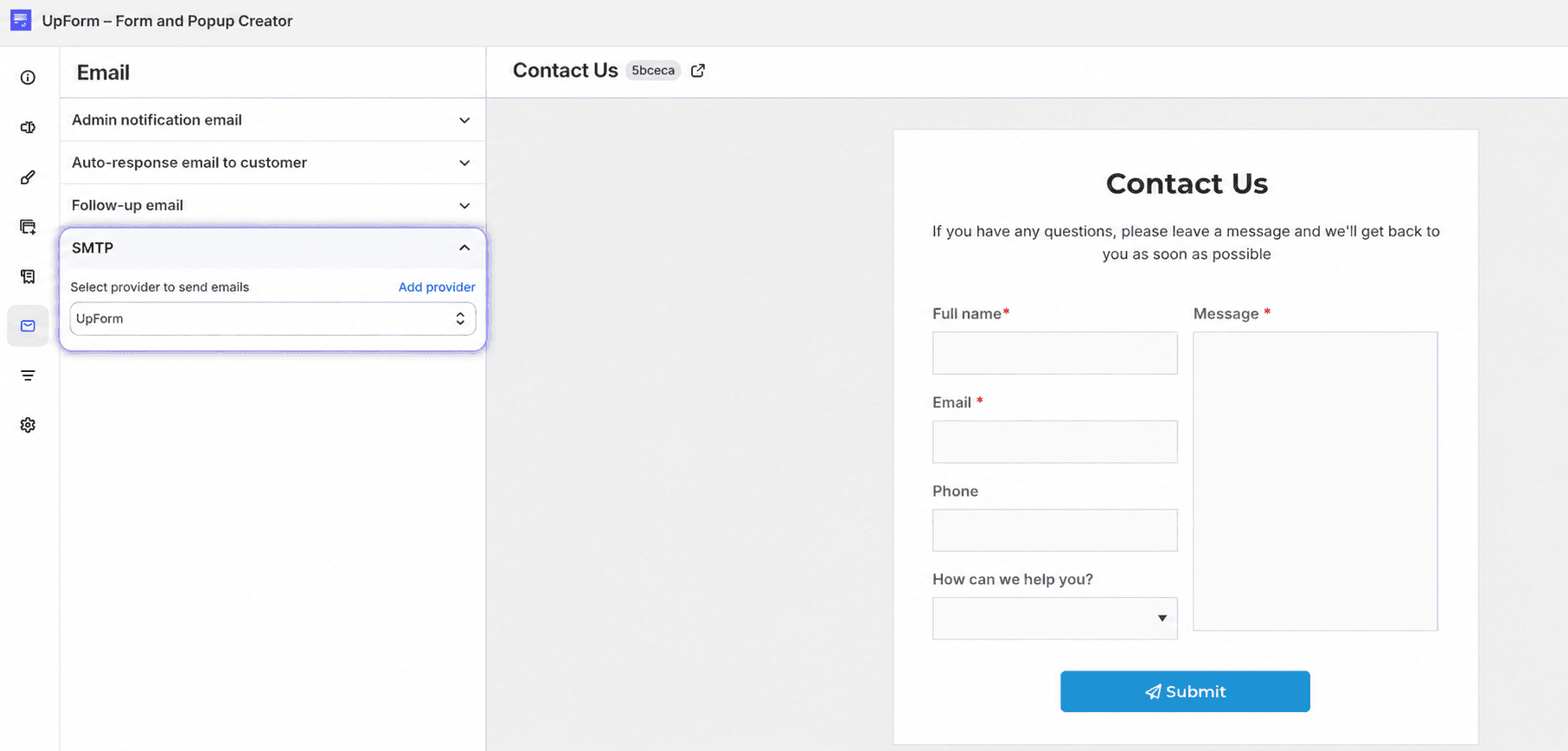
After you save, admin notifications, customer emails, verification emails, and follow-ups for that form use the UpForm provider.
Other email providers
To send from your own email service instead, add a custom provider and select it for the form. In the form SMTP section, click Add provider, or go to Settings → Email configuration → Custom email providers.
Setup guides: