

Appearance
Keyphrase suggestions
To help your pages target terms customers are actively searching for, you can request focus and related keyphrase recommendations directly inside the editor.
IMPORTANT
AI-generated output may be inaccurate or incomplete. Review every suggestion before you apply it or publish changes on your store. See About AI, the Terms of Service, and the Privacy Policy.
Before you begin
- Open a page in SEO Audit.
- Finding a focus keyphrase requires the page to have a title first.
- Finding related keyphrases requires a focus keyphrase first.
Find keyphrase suggestions
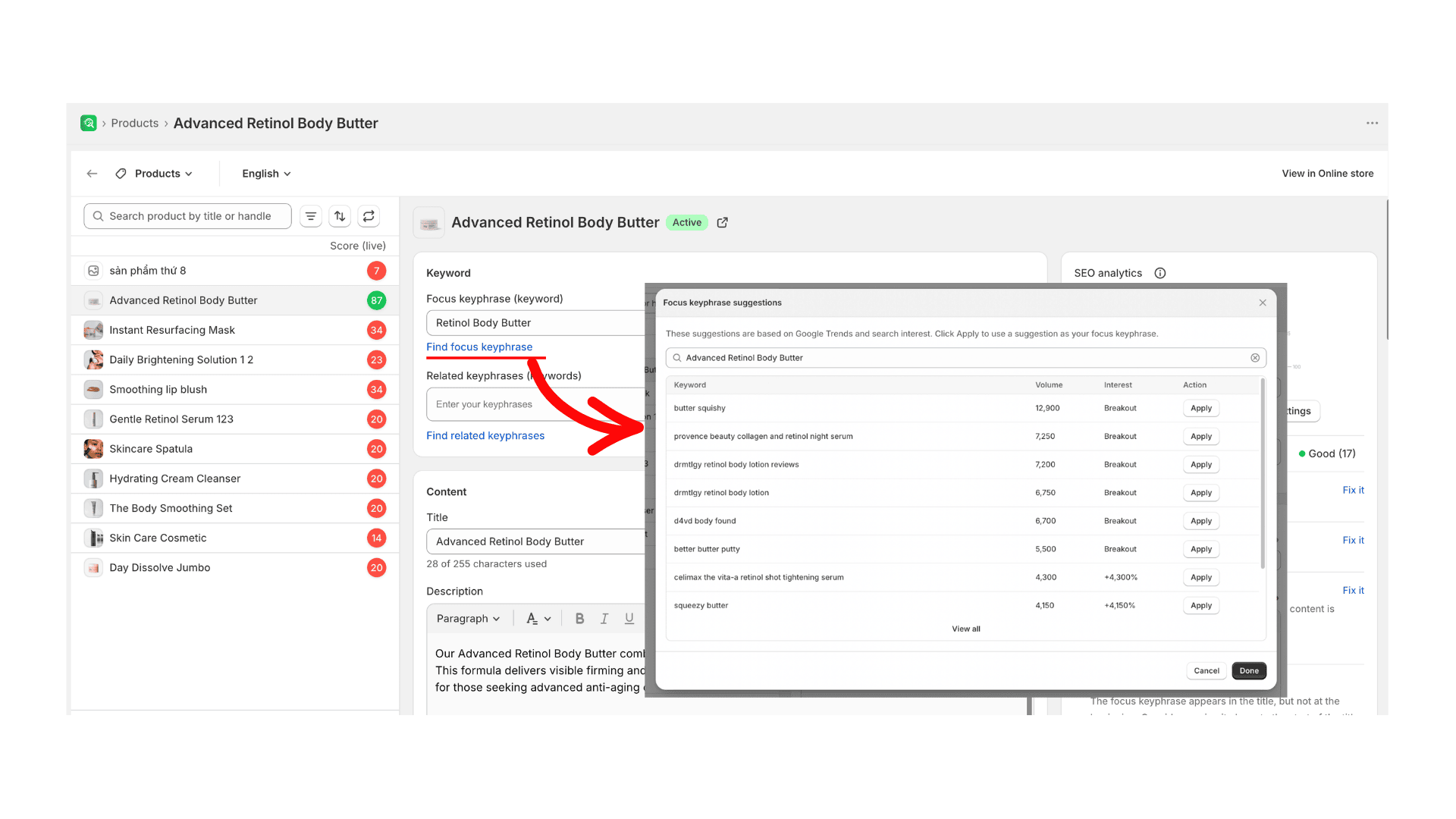
- To find a focus keyphrase, ensure your page has a title, and select Find focus keyphrase.
- To find related keyphrases, ensure you have set a focus keyphrase, and select Find related keyphrases.
- Review the suggestions list, which displays search interest trends (for example, Google Trends data).
- Select Apply on a suggestion to add it to your page’s keyword settings.
Expected result
Applied suggestions are added to the page’s keyword settings. Review and save the page when you are ready.