

Appearance
Image alt text templates
Use Image optimization → Optimize image alt text to apply reusable alt text templates to store images in bulk. Alt text describes image content for search engines and customers who use screen readers.
To generate alt text for one image with AI, see Image alt text.
Before you begin
- Open SEOEngine from your Shopify admin.
- Decide which resource types to update: Products, Collections, Blog posts, and Other images.
- Prepare the alt text templates and shortcodes you want to apply.
Apply alt text templates
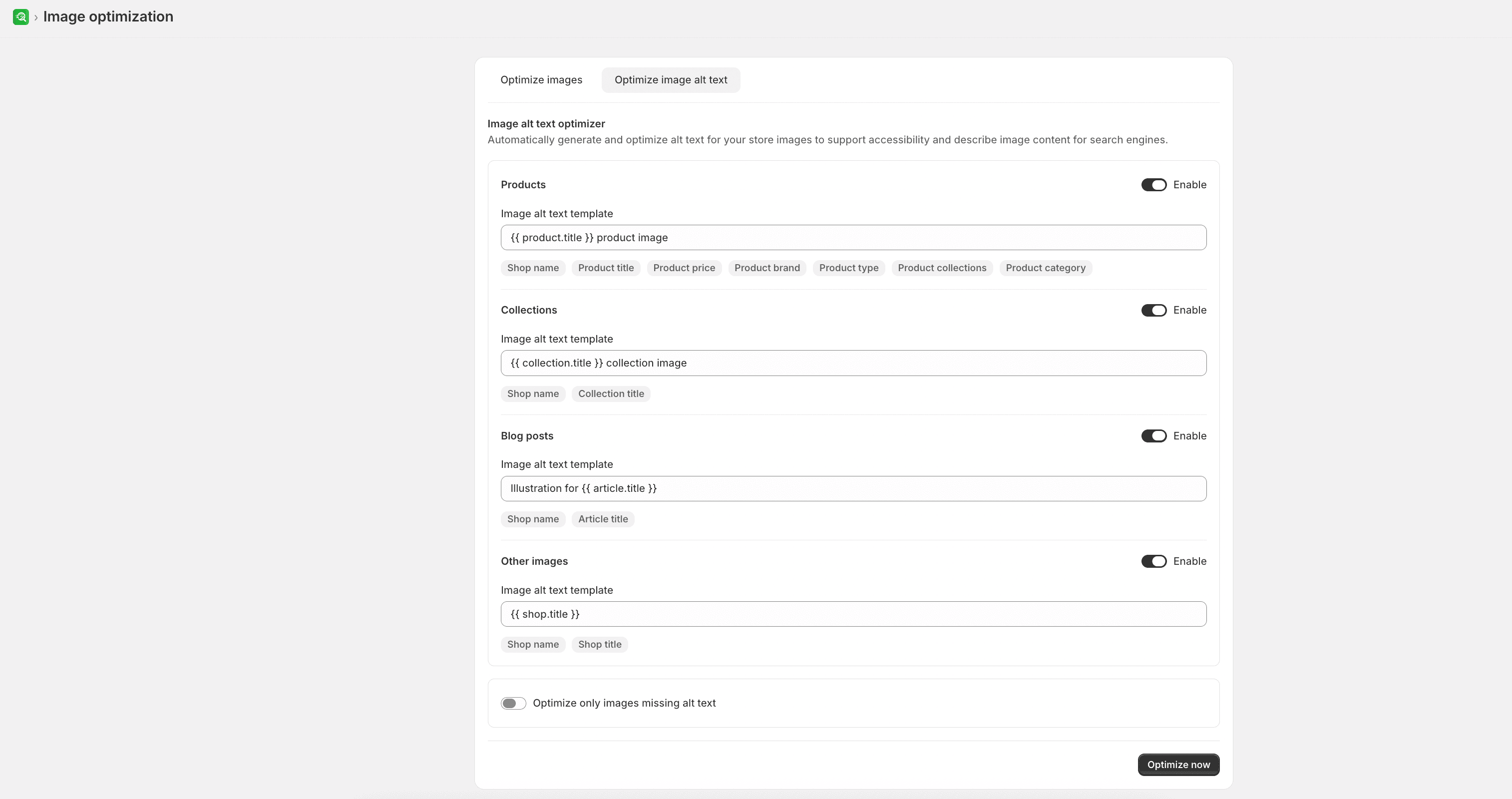
- Open Image optimization, and then select Optimize image alt text.
- Turn on Enable for each resource type that you want to update:
- Products
- Collections
- Blog posts
- Other images
- Enter an Image alt text template for each enabled resource type. Insert or select shortcodes from the options available in the app.
- Select Optimize only images missing alt text if you do not want to replace existing alt text.
- Select Optimize now.
Expected result
The app displays progress while alt text optimization runs. You can leave the page during processing and cancel an optimization that is still in progress.
Limitations
- Insert or select alt text shortcodes from the options available in the app.