

Appearance
Meta templates
Create reusable templates for your store’s meta titles, meta descriptions, and image alt text, then apply them in bulk. Templates help keep search appearance layouts consistent as your catalog grows.
You can create and apply templates for products, collections, content pages, and blog posts.
Before you begin
- Open SEOEngine from your Shopify admin.
- Decide the application scope for each resource type:
- Only items with missing meta values fills pages that do not currently have custom meta details.
- All items (replace existing meta values) overwrites existing custom meta details with the template layout.
- Plan a safe review flow: start with a clear template layout, use View example to review sample structures, and prefer Only items with missing meta values until you are confident the template is correct.
Apply bulk meta templates
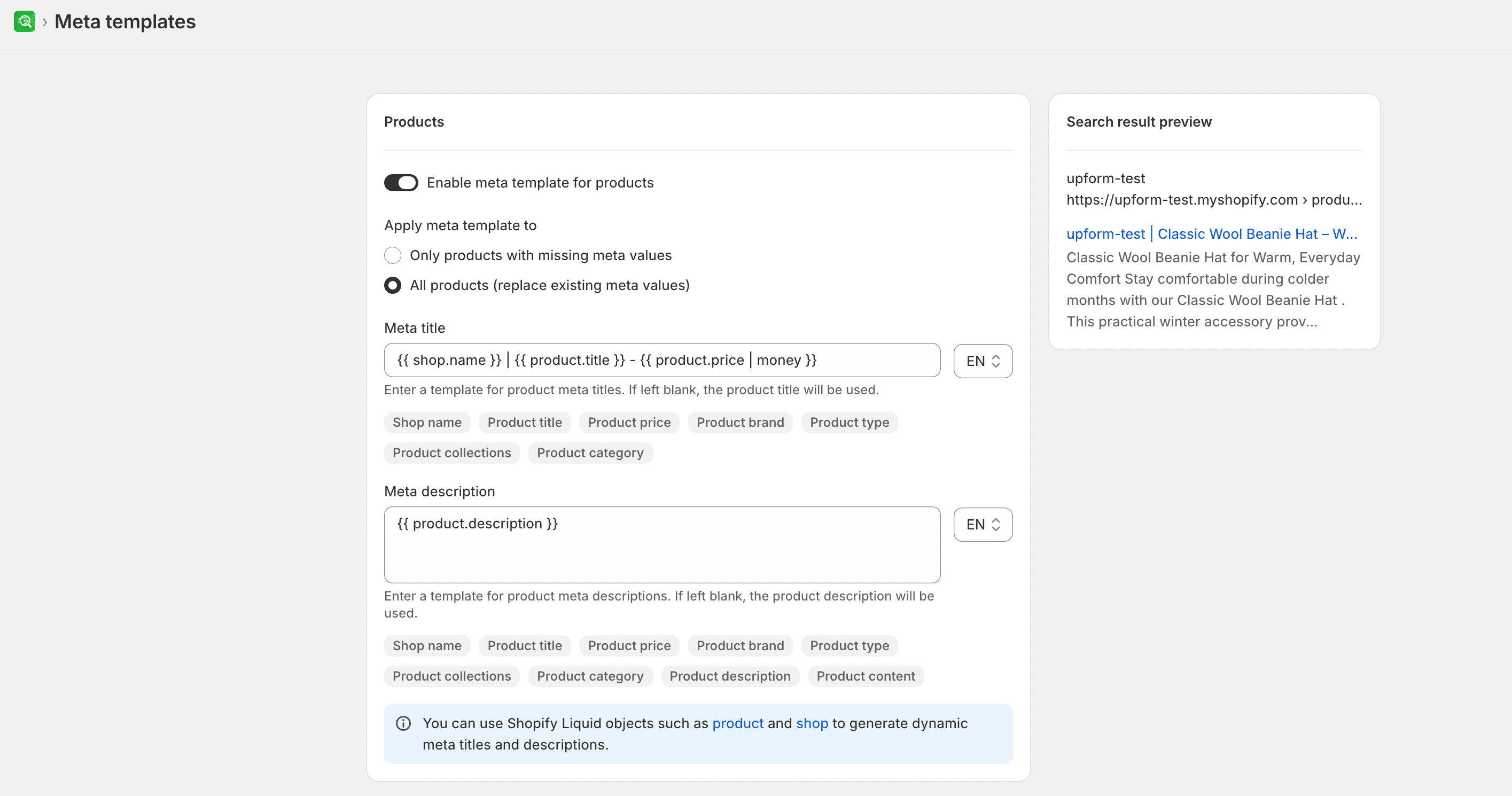
- From SEOEngine, open Meta templates.
- Select the resource tab you want to target (such as Products or Collections).
- Turn on Enable meta template for... to activate the template for that page type.
- Choose the scope of application:
- Only items with missing meta values: Fills in only pages that do not currently have custom meta details.
- All items (replace existing meta values): Overwrites all existing custom meta details with the new template layout.
- In the template fields, enter your desired format for Meta title, Meta description, and Image alt content (if available for that page type).
- Insert or select shortcodes from the options available in the app so values such as the store name, page title, or product price are filled automatically. Select View example to review sample structures.
- Under the search options, select whether you want to allow search engines to display these pages in search results.
- Select Save to apply the templates.
Expected result
Once saved, pages in the selected scope update their search engine metadata based on your template configuration. The app uses Shopify Liquid objects—such as product, collection, shop, page, and article—to pull values dynamically.
WARNING
All items (replace existing meta values) overwrites existing custom meta details for the selected page type. Review your template and use View example before you save. Prefer Only items with missing meta values when you want to avoid replacing existing metadata.
Template shortcodes
Shortcodes act as placeholders that pull information from your Shopify store. Insert or select them from the options available in the app. The variables you can use depend on the type of page you are optimizing:
| Page type | Supported shortcodes |
|---|---|
| All pages | Shop name, Shop title, Separator |
| Products | Product title, Product price, Product brand, Product type, SKU, Barcode, Vendor, and other catalog variables |
| Collections | Collection title, Collection description |
| Pages | Page title, Page content |
| Blog posts | Article title, Article content, Article excerpt |
Example layout (human-readable placeholders)
Insert or select shortcodes from the options available in the app. Do not invent literal shortcode syntax.
- Meta title: Product title · Shop name
- Meta description: Product title — Product type from Shop name
- Image alt content: Product title from Shop name
Exact available shortcodes depend on the selected resource tab and what the app shows for that page type.
Limitations
- Replacing existing meta values overwrites custom details for items in scope. Confirm the scope before you save.
- Insert or select shortcodes from the options available in the app for the selected page type.