

Appearance
HTML Sitemap
An HTML sitemap is a visitor-facing page on your store that lists links to your products, collections, pages, and blog posts. It helps customers navigate your site and helps search engines discover deeper links.
For crawler-facing sitemap configuration, see XML Sitemap.
Before you begin
- SEOEngine is installed and open in your Shopify admin.
- You know which products, collections, pages, and blogs should appear on the HTML sitemap page.
Create an HTML Sitemap page
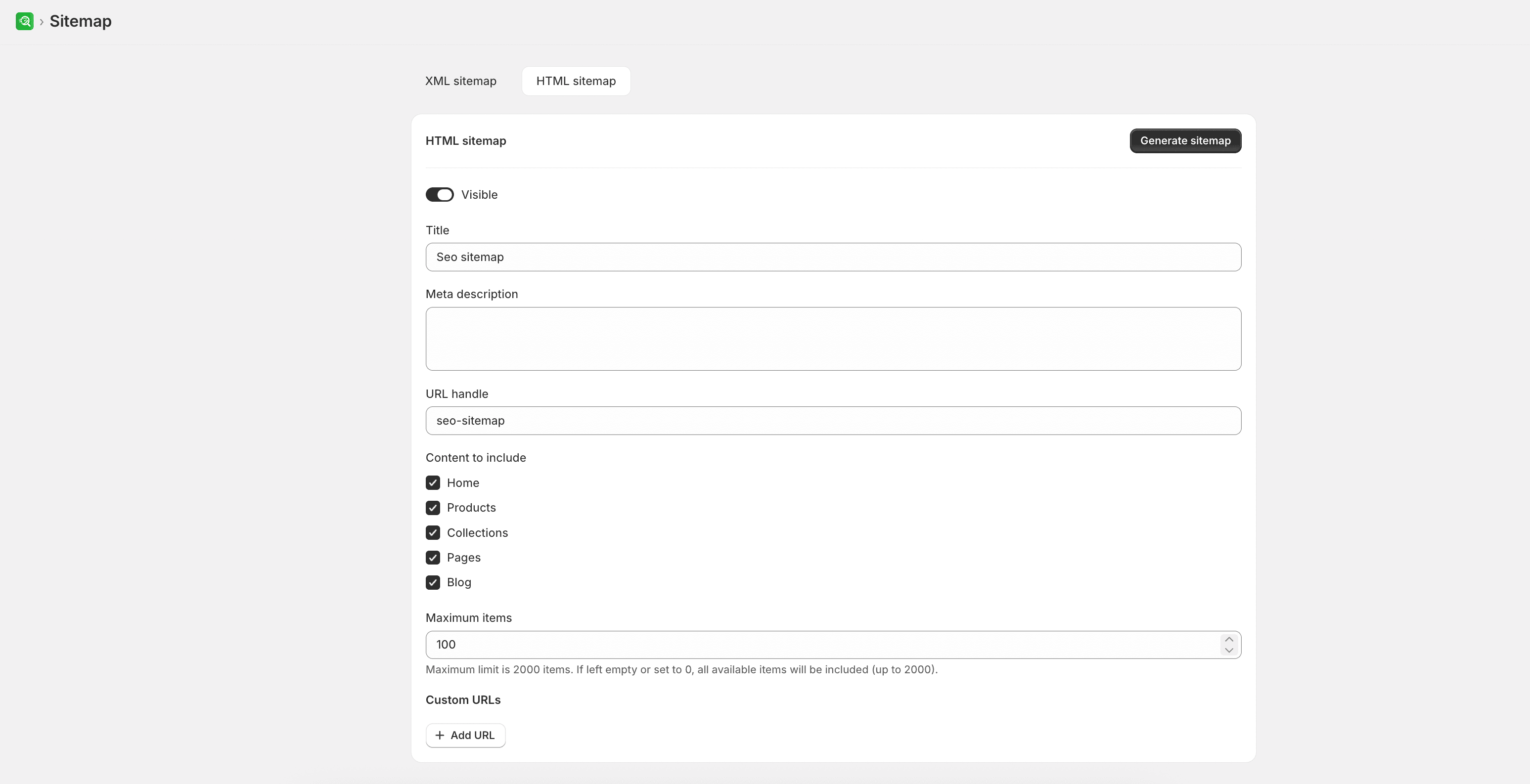
- Open Sitemap and select the HTML Sitemap tab.
- Turn on the Visibility setting to make the sitemap page active.
- Customize the metadata for the sitemap page, including its Title, Meta description, and URL handle. If you modify the handle, you can select the option to automatically create a URL redirect from the old path.
- Under the Page include options, check the page types you want to link on the sitemap (such as products, collections, pages, or blog posts).
- Set the Limit items value (up to 2,000) to control how many links are displayed. Set the value to
0or leave it empty to include as many pages as possible. - Optional: Under Custom URLs, add links to external pages or specific promotional URLs by entering the URL and a display name.
- Select Generate sitemap (or Regenerate sitemap if updating an existing one).
- Select View page to review the published sitemap page on your storefront.
Expected result
After generation, use View page to confirm the published HTML sitemap matches your inclusion settings.